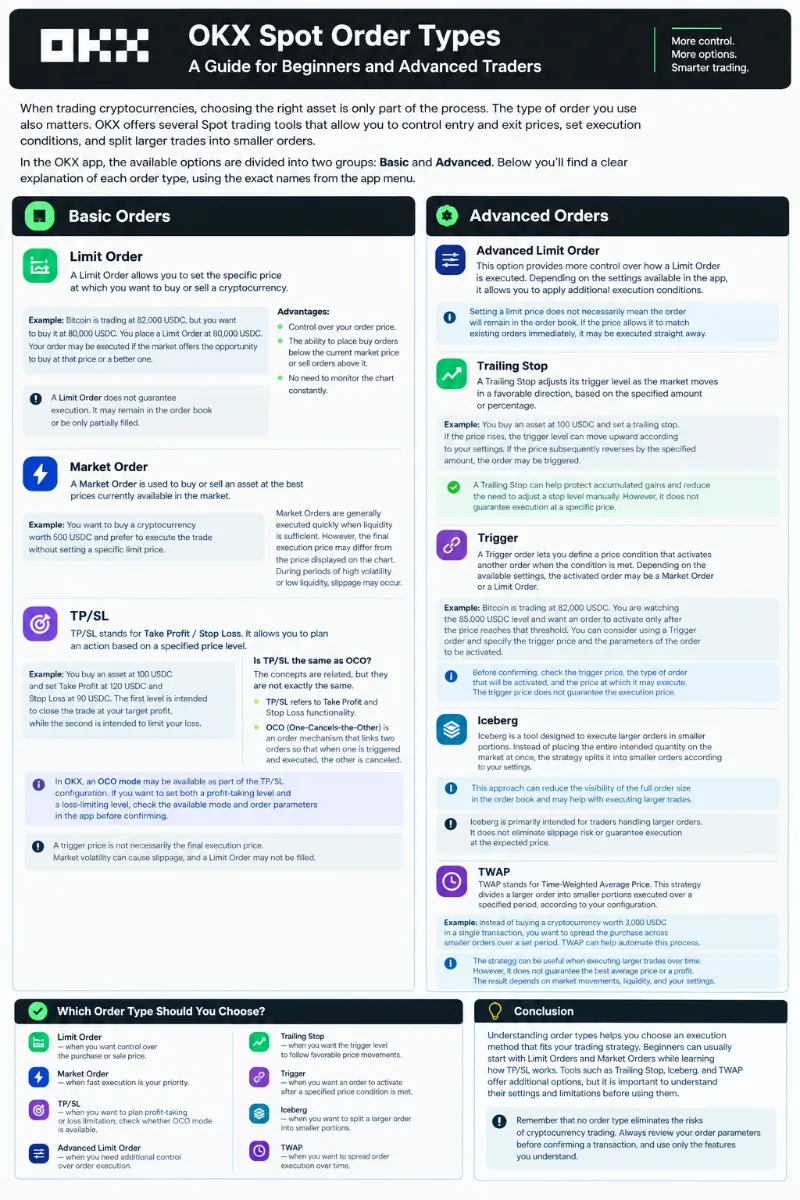

When trading cryptocurrencies, choosing the right asset is only part of the process. The type of order you use also matters. OKX offers several Spot trading tools that allow you to control entry and exit prices, set execution conditions, and split larger trades into smaller orders.
In the OKX app, the available options are divided into two groups: Basic and Advanced. This guide follows the order names provided in the app menu.
1. Basic Orders
Limit Order
A Limit Order allows you to set the specific price at which you want to buy or sell a cryptocurrency.
Example: Bitcoin is trading at 82,000 USDC, but you want to buy it at 80,000 USDC. You place a Limit Order at 80,000 USDC. Your order may be executed if the market offers the opportunity to buy at that price or a better one.
Advantages:
Control over your order price.
The ability to place buy orders below the current market price or sell orders above it.
No need to monitor the chart constantly.
A Limit Order does not guarantee execution. It may remain in the order book or be only partially filled.
Market Order
A Market Order is used to buy or sell an asset at the best prices currently available in the market.
This option is suitable when execution speed is more important than specifying an exact price.
Example: You want to buy a cryptocurrency worth 500 USDC and prefer to execute the trade without setting a specific limit price.
Market Orders are generally executed quickly when sufficient liquidity is available. However, the final execution price may differ from the price displayed on the chart. During periods of high volatility or low liquidity, slippage may occur.
TP/SL
TP/SL stands for Take Profit / Stop Loss. It allows you to plan an action based on a specified price level.
Take Profit is used to secure a planned profit, while Stop Loss is intended to help limit losses if the market moves against your position.
Example: You buy an asset at 100 USDC and set Take Profit at 120 USDC and Stop Loss at 90 USDC. The first level is intended to close the trade at your target profit, while the second is intended to limit your loss.
Is TP/SL the same as OCO?
The concepts are related, but they are not exactly the same.
TP/SL refers to Take Profit and Stop Loss functionality.
OCO stands for One-Cancels-the-Other. It is an order mechanism that links two orders so that when one is triggered and executed according to its order conditions, the other is canceled.
In OKX, an OCO mode may be available as part of the TP/SL configuration. If you want to set both a profit-taking level and a loss-limiting level, check the available mode and order parameters in the app before confirming.
Remember that a trigger price is not necessarily the final execution price. Market volatility can cause slippage, and a Limit Order may not be filled.
2. Advanced Orders
Advanced Limit Order
This option provides more control over how a Limit Order is executed. Depending on the settings available in the app, it allows you to apply additional execution conditions.
Setting a limit price does not necessarily mean the order will remain in the order book. If the price allows it to match existing orders immediately, it may be executed straight away.
Trailing Stop
A Trailing Stop adjusts its trigger level as the market moves in a favorable direction, based on the specified amount or percentage.
Example: You buy an asset at 100 USDC and set a trailing stop. If the price rises, the trigger level can move upward according to your settings. If the price subsequently reverses by the specified amount, the order may be triggered.
A Trailing Stop can help protect accumulated gains and reduce the need to adjust a stop level manually. However, it does not guarantee execution at a specific price.
Trigger
A Trigger order lets you define a price condition that activates another order when the condition is met. Depending on the available settings, the activated order may be a Market Order or a Limit Order.
Example: Bitcoin is trading at 82,000 USDC. You are watching the 85,000 USDC level and want an order to activate only after the price reaches that threshold. You can consider using a Trigger order and specify the trigger price and the parameters of the order to be activated.
Before confirming, check the trigger price, the type of order that will be activated, and the price at which it may execute. The trigger price does not guarantee the execution price.
Iceberg
Iceberg is a tool designed to execute larger orders in smaller portions. Instead of placing the entire intended quantity on the market at once, the strategy splits it into smaller orders according to your settings.
This approach can reduce the visibility of the full order size in the order book and may help with executing larger trades.
Iceberg is primarily intended for traders handling larger orders. It does not eliminate slippage risk or guarantee execution at the expected price.
TWAP
TWAP stands for Time-Weighted Average Price. This strategy divides a larger order into smaller portions executed over a specified period, according to your configuration.
Example: Instead of buying a cryptocurrency worth 3,000 USDC in a single transaction, you want to spread the purchase across smaller orders over a set period. TWAP can help automate this process.
The strategy can be useful when executing larger trades over time. However, it does not guarantee the best average price or a profit. The result depends on market movements, liquidity, and your settings.
Which Order Type Should You Choose?
Limit Order — when you want control over the purchase or sale price.
Market Order — when fast execution is your priority.
TP/SL — when you want to plan profit-taking or loss limitation; check whether OCO mode is available.
Advanced Limit Order — when you need additional control over order execution.
Trailing Stop — when you want the trigger level to follow favorable price movements.
Trigger — when you want an order to activate after a specified price condition is met.
Iceberg — when you want to split a larger order into smaller portions.